
Yes: WebP should be your storefront default in 2026, with JPEG kept only where a specific marketplace feed demands it. Expect file sizes to drop by 25 to 35% compared with JPEG at equivalent quality, which typically shaves real time off Largest Contentful Paint on product pages. The one caveat worth testing before you flip the switch: legacy in-app webviews and some marketplace upload tools still choke on WebP, so check your actual device mix first.
TL;DR:
- Compressing images from JPEG to WebP can reduce file sizes by 25 to 35%, significantly speeding up load times and lowering CDN costs.
- To ensure compatibility, serve WebP images using the
<picture>element or CDN format negotiation, and maintain JPEGs for marketplaces like Amazon and Google Merchant Center.- Automate WebP conversion from high-resolution master images, using quality settings of 80-85 for hero images and 65-72 for thumbnails for optimal balance of size and detail.
- Measuring impact through metrics like Largest Contentful Paint, Cumulative Layout Shift, and page weight confirms WebP's role in improving load speed and user experience.
Table of Contents
- Why WebP matters for ecommerce image performance
- Will WebP break images for any of my customers?
- Implementation checklist: from master image to live product page
- Platform-specific behaviour: Shopify, WooCommerce and image CDNs
- How do you measure the real impact of switching to WebP?
- Applying WebP to furniture product pages and room previews
- Does WebP change how you write alt text or affect accessibility?
- WebP today, AVIF tomorrow, but only when it earns its place
- Faster pages solve loading doubt, but not fit doubt
- Sources
- FAQ
Why WebP matters for ecommerce image performance
Product-heavy stores live and die by how many images they load per page. A category grid with 40 thumbnails, a product page with eight gallery shots, and a handful of zoom images all multiply the same problem: every kilobyte you shave gets repeated hundreds of times across a session. That's where WebP's 25 to 35% size reduction versus JPEG stops being a marginal win and starts compounding across the whole catalogue.
WebP also handles transparency far better than PNG, which matters for cut-out product shots, badges, and overlay graphics common on furniture and homeware listings. PNG's lossless compression keeps files large even for simple transparent backgrounds; WebP's alpha channel support gets similar visual results at a fraction of the weight.
The knock-on effects show up where it counts commercially:
- Smaller images mean faster Largest Contentful Paint, which is a ranking and user-experience signal.
- Faster-loading galleries reduce bounce on mobile connections, where most furniture browsing now happens.
- Lower total page weight cuts your CDN bandwidth costs at scale, not just your load times.
None of this requires new photography. It's the same JPEGs and PNGs you already have, re-encoded.
Will WebP break images for any of my customers?
Browser support for WebP is broad across current desktop and mobile browsers, so for most storefronts this isn't the risk it was a few years ago. The real exposure sits in edge cases: older embedded webviews inside some social apps, certain point-of-sale kiosk browsers, and a handful of legacy tablet devices still used in showrooms. Test against your own analytics before assuming universal support.
Three practical steps cover you:
- Serve WebP through the
<picture>element with<source>andtypeattributes, so unsupported browsers automatically fall back to JPEG without any JavaScript. - Alternatively, let your image CDN handle format negotiation on the fly, detecting the requesting browser and returning the right format automatically.
- Keep JPEG exports for any channel that requires them, Amazon and Google Merchant Center both expect standard raster formats in their feeds, so maintain a JPEG export path for those specific pipelines even after your storefront moves to WebP.
Implementation checklist: from master image to live product page
Get the pipeline right once and it runs itself for every new SKU afterwards.
Start with one high-resolution master image per product, shot or rendered at the largest size you'll ever need. Resize down to the actual display width before you compress; compressing an oversized image and then scaling it in the browser wastes bytes and does nothing for quality.
Quality settings depend on the image's job:
- Hero and gallery images: quality 80 to 85, where detail on fabric texture or wood grain still matters.
- Thumbnails and grid images: quality 65 to 72, since shoppers are scanning, not inspecting.
- Zoom or "inspect closely" images: push quality higher, since these are the ones shoppers use to check stitching, joinery, or finish before buying.
Once you have compressed assets, build responsive delivery with srcset and sizes so browsers request only what they need for the viewport. Set explicit width and height attributes on every image tag to reserve layout space and stop Cumulative Layout Shift as images pop in. Lazy-load everything below the fold; eager-load your hero image with fetchpriority="high" so it doesn't queue behind lower-priority assets.
Automate the conversion itself rather than doing it by hand per SKU. Batch tools and build-pipeline scripts can convert and integrate WebP exports into your deployment workflow as a standard step, and most image CDNs offer on-the-fly conversion as an alternative if you'd rather not manage a build step at all.
Pro Tip: Keep one untouched master file per SKU in a separate archive folder. Every quality setting, crop, or resize decision should derive from that master, never from a previously compressed export. Recompressing a compressed file stacks quality loss you can't undo.
Platform-specific behaviour: Shopify, WooCommerce and image CDNs
Shopify automatically serves WebP to supporting browsers through its own CDN, so on Shopify themes the main job is checking your theme code doesn't override that with hardcoded <img> tags pointing at JPEG URLs directly.
WooCommerce needs more hands-on attention. Follow this order when auditing a WooCommerce catalogue:
- Check whether your theme or an image-optimisation plugin is generating duplicate WebP files alongside originals, which can bloat media storage without ever being served if the theme doesn't reference them correctly.
- Confirm the plugin's fallback method actually works in a browser that doesn't support WebP, some rewrite server rules incorrectly rather than negotiating format properly.
- Audit for broken image paths after switching, plugin conflicts here are the most common cause of missing product photos post-migration.
Image CDNs generally offer the least maintenance: they convert on the fly per request, so you upload once and let the CDN handle format negotiation, resizing, and quality per device. Build-time conversion is worth preferring only when you want full control over exact output files or you're not running a CDN layer at all.
How do you measure the real impact of switching to WebP?
Track three numbers before and after: Largest Contentful Paint, Cumulative Layout Shift, and total page weight. LCP tells you how fast the main product image feels to load; CLS tells you whether missing width/height attributes are causing jumps; total page weight tells you what you're actually saving.
Converting a hero image from an unoptimised multi-megabyte JPEG to a correctly sized WebP file has been shown in WebPageTest traces to cut LCP by more than a second on mobile connections, a difference a shopper will feel even if they never notice why.
For testing, run PageSpeed Insights for lab data and WebPageTest for detailed waterfall traces on real connection profiles, then sample actual field data from a handful of real devices rather than trusting lab scores alone.
- Compare LCP and page weight on the same product page before and after conversion.
- Run an A/B test on conversion rate across a meaningful sample of sessions, not just a few days of traffic, before declaring a speed change responsible for a sales lift.
- Recheck CLS specifically on pages where you added lazy-loading, since that's the most common place layout shift creeps back in.
Applying WebP to furniture product pages and room previews
Furniture retailers deal with heavier image demands than most categories: large-format hero shots, multiple angle photos, and increasingly, composited room-preview renders. A master-image-to-WebP pipeline reduces the payload on all of them, including previews generated by tools like Aifurniture's visualiser, where faster-loading source images mean a snappier render for the shopper.
The compositing step that overlays a sofa or table onto a customer's uploaded room photo works from the same product image already on your PDP. Keep that source image in WebP for internal use and gallery display, but retain a JPEG export specifically for any marketplace feed that still requires it.
Pro Tip: If you're running a compositing or visualisation widget alongside your storefront, feed it the same optimised WebP master you use for your gallery. There's no benefit to maintaining a separate, heavier source file just for the preview tool.
Does WebP change how you write alt text or affect accessibility?
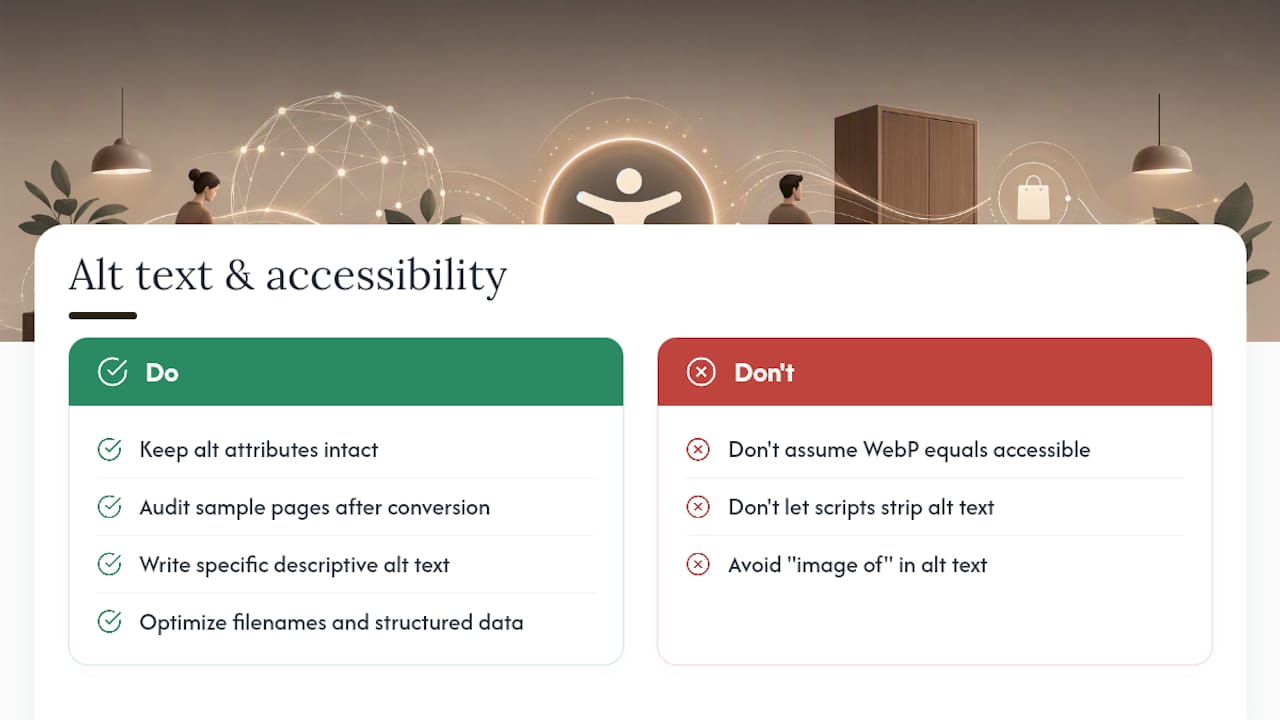
No. WebP has no bearing on how screen readers announce an image or how alt text should be written; accessibility depends entirely on the alt attribute itself, not the file format behind it. A WebP image with no alt text is exactly as inaccessible as a JPEG with no alt text.
What does change slightly is your workflow discipline during a bulk format migration. When you batch-convert hundreds or thousands of product images from JPEG to WebP, it's easy for automation scripts to strip or fail to carry over the alt attribute if they're rebuilding image tags rather than just swapping the file extension. Audit a sample of converted pages after any bulk migration specifically for missing or blank alt text, not just for broken image paths.
Good alt text for ecommerce product images still follows the same rules regardless of format: describe the product specifically ("oak dining table with tapered legs, seats six" rather than "table"), skip keyword stuffing, and avoid redundant phrases like "image of" since screen readers already announce it as an image. Search engines index WebP without issue, and image ranking signals remain driven by alt text, file naming, and structured data rather than format choice, so there's no SEO trade-off to worry about on either front. If anything, the faster page loads WebP enables give you a secondary SEO benefit through improved Core Web Vitals scores, on top of whatever your alt text and metadata are already doing.
WebP today, AVIF tomorrow, but only when it earns its place
WebP is the correct baseline for 2026, not a stopgap while you wait for something better. AVIF can shave a further 10 to 20% off file size compared with WebP, and that's a genuine gain on a large catalogue. But AVIF encoding is slower, theme and plugin support across ecommerce platforms is patchy, and chasing it before your pipeline is stable is solving a problem you don't have yet.
My advice: get WebP fully deployed and measured first. Test AVIF selectively on your highest-traffic hero images once that baseline is solid, and judge it on your own encoding time and quality trade-off, not on a spec sheet.
— Michael
Faster pages solve loading doubt, but not fit doubt
Optimising images to WebP solves a real problem: shoppers leaving before a slow page finishes loading. It doesn't solve a different one, whether that sofa actually suits their living room. That's a separate kind of hesitation, and it's the one that drives returns even after a purchase goes through.
A visualisation widget can address that second problem directly. A shopper uploads a photo of their own room, and within a short time the retailer's product is composited into that photo, no app download, no 3D modelling, just the retailer's existing product photography superimposed realistically into the customer's space. It runs on the same JPEGs or WebP files already sitting in your catalogue.
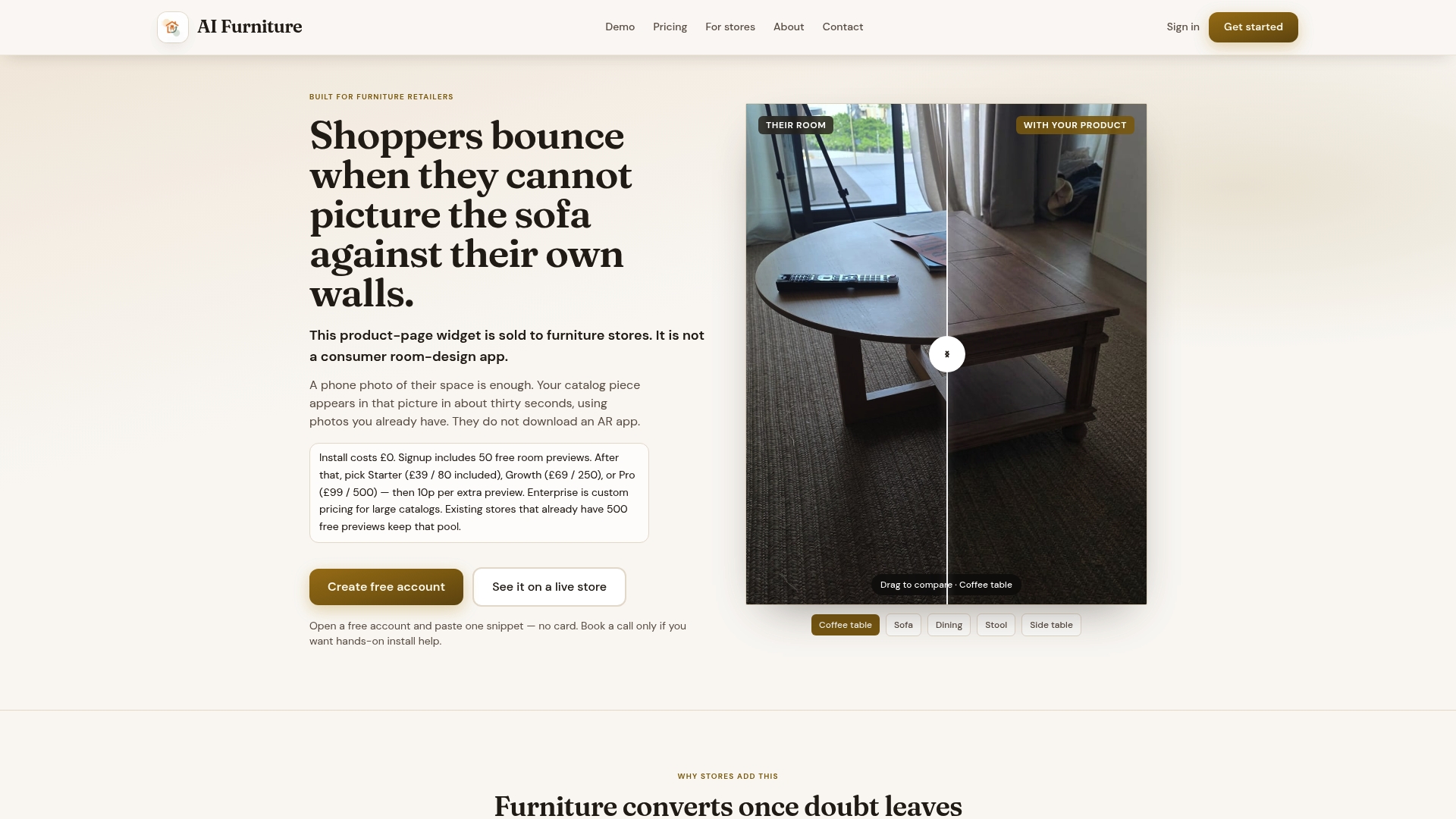
The sensible rollout order: optimise your images to WebP site-wide first, since that's a foundational speed win for every visitor. Then run the widget on a subset of your highest-return SKUs and measure the difference in conversion and return rate against the rest of your catalogue. Aifurniture's free tier includes 500 previews to test the approach before any usage-based billing kicks in, so you can validate the impact on real product pages before deciding whether to scale it further. If you're weighing this against 3D modelling or traditional photography-based AR, the comparison breakdown covers where each approach actually fits.
Sources
Start with MDN's <picture> element documentation for exact fallback syntax, WebPageTest for real-device LCP measurement, and this freeCodeCamp pipeline walkthrough for batch conversion examples. For product page copy that pairs well with faster images, this guide to product page optimisation is worth a read.
- Pros and cons of WebP images — 2026 update | Tinify blog
- MDN: HTML <picture> element
- WebPageTest
- Make your website load lightning fast with WebP images | freeCodeCamp
FAQ
What are the disadvantages of using WebP?
The main drawbacks are patchy support in some legacy in-app webviews and the extra step of maintaining a JPEG export path for marketplace feeds that require it. Encoding time and tooling maturity are minor concerns compared with the file-size gains for most stores.
What is the best image size for ecommerce product photos?
There's no single universal size, resize each image to the actual display width it will be rendered at (hero, gallery, or thumbnail), rather than serving one oversized master everywhere and letting the browser scale it down.
Is WebP really better than JPEG for online stores?
For most ecommerce use cases, yes: WebP typically delivers 25 to 35% smaller files than JPEG at equivalent visual quality, which directly improves page load speed and Core Web Vitals scores.
Is WebP better than PNG for product images?
For photographic product images, yes, WebP compresses far more efficiently than PNG. For images needing transparency, such as cut-out product shots, WebP's alpha channel support also beats PNG on file size while keeping clean edges.
Does switching to WebP affect my Google product listing SEO?
No, Google indexes WebP without penalty, and product-image ranking continues to depend on alt text, file naming, and structured data rather than the image format itself.